


About Miso Editor
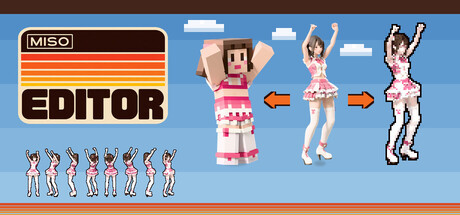
From one 3D model to an animated sprite sheet
Rigging, animating, and rendering multiple directions by hand can take days for a single character. Miso Editor is a desktop tool for taking 3D characters through rigging, motion setup, and 1 to 64-direction sprite sheet export in one interface. It also supports weapon setup and offers a user interface in 29 languages. The Steam version does not include image generation or 3D model generation; you start by rigging your own 3D model or a sample character. BLOCKIFY (blocky characters) and rig fixing with an AI agent are not included yet and are under review.
Not in the Steam version yet
- BLOCKIFY (blocky characters): under review
- Rig fixing with an AI agent: under review
These features may be added to the Steam version in a future update.
The developer is making Fire Field, a 90s-style isometric ARPG on Steam, and the enemies in that game were made with this tool.

Rigging to export runs on your own PC
Rigging, motion setup, weapon setup, baking, and export run locally on your PC and can be used offline. Miso Editor itself has no monthly subscription fee.

Import your own 3D model (GLB / FBX / OBJ / ZIP) and go straight to rigging
A sample character and sample weapons (sword, axe, bow) are included, so you can try the whole workflow right away
What it does
Auto Build: select your own 3D model or the sample character to run rigging, motion setup, and export automatically in sequence. Designed to be accessible without specialist 3D knowledge, though some models may need manual rigging adjustments (initial setup requires downloading free motions from Mixamo)
Import your own 3D model (GLB / FBX / OBJ / ZIP). Rigged humanoid models whose bone names differ from Mixamo can be imported too (bone roles are matched from the shape, and you can pick them again by hand)
Auto-rigging: adds a humanoid skeleton automatically, right on your own PC. About 1-6 minutes on an NVIDIA GPU, or it runs on the CPU if you have no GPU. If the auto result is off, you can place 8 markers by hand (chin, elbows, wrists, knees, crotch) and rig again
Motion: drag in free motion FBX files from Mixamo to apply them to the rig and preview them instantly
Weapons: give your character a one-handed weapon, a two-handed greatsword, or a shield. The weapons and their slash trails are baked into the sprites. A sample sword, axe, and bow are included, and you can import your own weapon models

Sprite baking: renders 1, 2, 4, 8, 16, 32, or 64-direction sprite sheets
RPG Maker MZ export: bake with the RPG Maker MZ camera and it also writes a ready-to-use 4-direction walking character sheet ($name.png, 3x4 frames)
Camera presets: 2:1 isometric, true isometric, top-down, overhead, side view, first-person, and custom (save your own by name)
Per-motion and per-character settings: frame count, duration, looping, frame size, sheet width, character height, and facing direction

Output

PNG sprite sheets plus a text file describing each frame (anim.txt)
Aseprite-format JSON frame data for each sheet (.aseprite.json)
A separate grid sheet for each animation (PNG + JSON)
Everything for a character in one ZIP download
RPG Maker MZ character sheets
Rigged 3D models (FBX / GLB), with or without applied motions
What you need
A 3D character model (GLB / FBX / OBJ / ZIP). You can also try the sample character
Free motion FBX files from Mixamo: download them with a free Mixamo account. No Miso Editor account is needed
No other software to install: everything needed for 3D processing and rendering is included
For auto-rigging, either an NVIDIA GPU with 4 GB+ VRAM, or 16 GB+ of PC memory: with no NVIDIA GPU, rigging runs on the CPU instead (about 1-8 minutes). Manual rigging: if your PC has neither, you can rig by hand. Place 8 markers (chin, elbows, wrists, knees, crotch) on the character
Supported OS
Windows 10 / 11 (64-bit)
Screen languages
The screen is available in 29 languages (English, 日本語, 简体中文, 繁體中文, 한국어, Русский, Español, Português (Brasil), Português (Portugal), Deutsch, Français, Polski, Türkçe, ไทย, Українська, Italiano, Čeština, Magyar, Svenska, Nederlands, Dansk, Tiếng Việt, Bahasa Indonesia, Suomi, Română, Norsk, Ελληνικά, Български, العربية).
Who this is for
Developers who need many multi-direction character sprites for any kind of 2D-sprite game, such as RPGs, action RPGs, roguelikes, strategy games, and shooters. Any view works: isometric, top-down, overhead, side-view, or first-person (classic sprite enemies), or any angle you set with a custom camera
RPG Maker MZ users who want walking characters made from their own 3D models
People who have 3D models but would rather not spend time on rigging and render setup
Anyone who wants smooth 16, 32, or 64-direction facing, not just 8
Anyone who wants to keep a rigged 3D model alongside the sprites
Please note
Auto-rigging is designed for humanoid characters (two legs, two arms). Quadrupeds or heavily stylized shapes may not rig well
Works best with: a front-facing character with legs slightly apart. A normal T-pose without spread fingers is recommended (A-pose also works)
Tends to break: long capes, robes, or long skirts; baggy pants with the legs together; weapons or items held in the hands (add weapons later with the weapon feature instead); arms hanging down at the sides
Wings, tails, and long hair stay attached to the body and do not sway naturally